There was a time when email was wonderfully boring.
You wrote a message, clicked send, and reasonably expected it to arrive. The same was true for websites. A WordPress site could send contact form notifications, password resets, WooCommerce order confirmations, and other transactional emails using its built-in mail functionality. Most business owners never had to think about SPF records, DKIM signatures, DMARC policies, DNS propagation, or sender reputation.
Those days are largely gone.
Over the last few years, email has transformed from a low-threshold communication tool into a heavily regulated ecosystem. Large providers such as Gmail and Microsoft now expect senders to prove their identity, prove which services are allowed to send on their behalf, and comply with increasingly strict authentication standards.
The reasoning is understandable. Spam, phishing, spoofing, and email fraud have become major problems. And better authentication helps combat abuse.
The problem is that the burden has largely been pushed onto business owners.
Today, a small configuration mistake can cause an email to disappear entirely. Your website says the email was sent. Your newsletter platform reports successful delivery. Your CRM shows no errors. Yet the recipient never sees the message.

Worse still, there is often no obvious feedback.
By the time the problem is discovered, an unknown number of leads, enquiries, booking requests, password resets, orders, and customer communications may already have been lost.
So here’s where understanding how email works will help you fix (or prevent) these email delivery issues.
What is email authentication
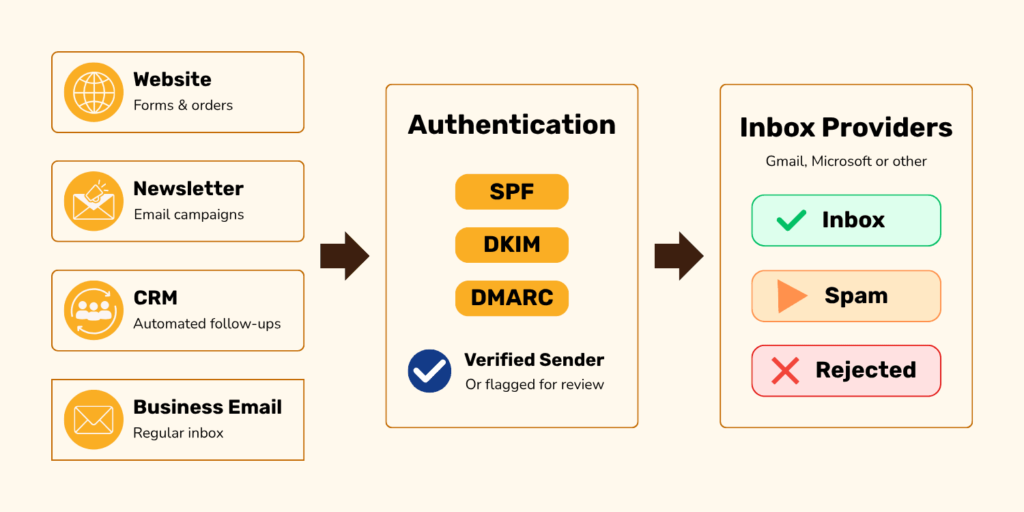
Email authentication is the process of proving that an email genuinely comes from the domain it claims to come from. Without authentication, anyone could potentially send email pretending to be your business. These settings are usually added to your domain’s DNS as TXT records. In simple terms, they act like public instructions that tell mail providers which emails should be trusted.
Modern email relies on three primary technologies:
SPF (Sender Policy Framework)
SPF determines which servers and services are allowed to send email for your domain.
DKIM (DomainKeys Identified Mail)
DKIM adds a digital signature that proves the email was authorized and wasn’t modified during delivery.
DMARC (Domain-based Message Authentication, Reporting and Conformance)
DMARC ties everything together and tells receiving mail providers how to handle messages that fail authentication checks.
Luckily you don’t need to understand every technical detail. But what matters is understanding that email delivery depends on these records being configured correctly.
Every service that sends email for your business needs to be considered:
- Your regular email provider
- Your website
- Your contact forms
- Your booking software
- Your CRM
- Your ecommerce platform
- Your newsletter platform
If even one of those services is configured incorrectly, delivery issues can occur. A great free tool to check if your email is missing these TXT records is MX toolbox.
Website email issues
Website-generated emails are often where businesses first notice problems.
Examples include:
- Contact form notifications
- Booking enquiries
- Password reset emails
- WooCommerce order emails
- Membership emails
- Course access emails
Historically, many WordPress websites relied on the default mail functionality. While the website may successfully generate and send the email, modern inbox providers often view these messages with suspicion.
The website may think everything worked perfectly, but the receiving provider may disagree.
This is why website email increasingly requires a proper SMTP (Simple Mail Transfer Protocol) or transactional email service combined with correct authentication records.
For most businesses, the solution involves:
1. Using a proper SMTP service
At the time of writing this article, we often recommend Brevo to our clients because its free plan includes up to 300 emails per day. If your website sends fewer than 300 form notifications or transactional emails per day, this service may be a good fit.
2. Sending from a domain-based email address
Your website emails should be sent from an address that uses your own domain, such as hello@yourbusiness.com, rather than a free email address like yourbusiness@gmail.com.
This helps email providers recognize that the message is connected to your business and makes your emails look more trustworthy to recipients.
For contact forms, it is best to send the message from your own domain email address and use the visitor’s email address as the reply-to address. That way, you can still reply directly to the person who submitted the form, while keeping the actual sending address properly authenticated.
This is usually configured in your website form, SMTP plugin, or email service settings.
3. Configuring SPF, DKIM, and DMARC correctly
These authentication records are usually added to your domain’s DNS settings and should account for every service that sends email for your business, including your website, newsletter platform, CRM, and regular email provider.
4. Testing and monitoring delivery
Even after everything is configured, email delivery should be checked from time to time. Fill out your own website contact form occasionally and send test messages to common inboxes like Gmail and Outlook. Also keep an eye on failed delivery notices, and unusual drops in form enquiries, bookings or order emails.
A quiet inbox is not always a good sign.
Gmail delivery issues
Gmail has become dramatically stricter about email authentication.
Many businesses discover this when emails that used to arrive reliably suddenly land in spam folders, promotions tabs, or disappear altogether.
In some cases, Gmail may go beyond filtering. Depending on the nature of the authentication failure, Gmail may refuse to accept the email at all. In these cases the sender sees an email being sent, but the recipient never receives it.
Common causes include:
- Missing SPF records
- Missing DKIM signatures
- Missing DMARC policies
- Unauthenticated newsletter platforms
- Misconfigured website email
- Poor sender reputation, which can happen when emails are reported as spam, bounce frequently, or look suspicious to mail providers
- Sending domains that don’t align properly with authentication records
Another major change is Gmail’s move away from older POP-based workflows. For years, many business owners used Gmail as a central hub for email hosted elsewhere. Gmail would pull messages from external mailboxes using the “Check mail from other accounts” feature. But that convenience is disappearing.
A mailbox may still exist with your hosting company, and email may still technically be arriving there, but Gmail may no longer fetch those messages into the inbox where you expect to see them.
This creates a particularly dangerous problem because nothing appears obviously broken. Businesses often discover weeks later that important emails have been sitting unread in a completely different mailbox.
This does not mean business owners can no longer use Gmail for business email. It means they may need a paid Google Workspace setup instead of relying on a free Gmail account to fetch mail from an external hosting account.
Microsoft email issues
Microsoft has followed a similar path. Outlook, Hotmail, Live, Exchange Online, and Microsoft 365 environments have become increasingly strict about sender authentication and reputation.
Like Gmail, Microsoft does not merely filter messages.
Depending on the circumstances, Microsoft may send messages to junk folders, quarantine them, throttle them, or reject them outright.
This is particularly frustrating because many corporate environments add additional layers of filtering and security.
An email may never reach the intended recipient even though the website shows it was sent and the sender receives no obvious error. So you’d incorrectly assume everything worked.
Common causes include:
- Missing SPF records
- Missing DKIM signatures
- Missing DMARC policies
- Poor sender reputation
- Misconfigured forwarding
- Suspicious attachments or links
- Website-generated email that lacks authentication

Businesses that regularly communicate with corporate clients should pay special attention to Microsoft delivery because these environments often have the strictest filtering.
Newsletter platform email issues
Newsletter platforms such as MailerLite, Mailchimp, ActiveCampaign, ConvertKit, Flodesk, and similar services have also been affected by the tightening of email requirements.
Years ago, you could create an account, add a sender address, upload contacts, and start sending. But today, that’s only half the setup.
Most newsletter platforms require domain authentication before you can achieve reliable delivery.
That typically means adding DNS records supplied by the platform and verifying ownership of the sending domain.
If these records are missing or incorrect, major inbox providers may:
- Send campaigns to spam
- Reduce inbox placement
- Reject messages entirely
- Damage your sender reputation over time
Authentication is only one part of newsletter delivery. Mail providers also pay attention to how people respond to your campaigns. If subscribers often mark your emails as spam, ignore them, or if you send too frequently to an unengaged list, your future campaigns may become less trusted.
A few practical recommendations:
- Use a domain-based sender address instead of a free Gmail or Outlook address
- Authenticate your domain properly
- Keep your contact lists clean by removing inactive or invalid subscribers
- Monitor delivery performance regularly
- Test before sending important campaigns
- Make it easy for people to unsubscribe instead of marking your emails as spam
- Send useful, relevant emails at a reasonable frequency
A note about email signatures
Email signatures can also affect delivery. A common issue is attaching a logo or promotional image to every email instead of using a lightweight, properly hosted image in the signature. HTML signature images are better than attachments, but they should still be kept small, reliable, and simple.
As a general rule, avoid unnecessary attachments in everyday email, especially logos, banners, or images that are added automatically to every message.
Email is no longer just “send and receive”
It now requires a little more setup, maintenance, and attention than it used to.
Unfortunately, many of these changes have been imposed from the top down by enormous technology companies, often with limited guidance for business owners. At best, you receive a technical manual. At worst, you receive no warning until something stops working.
The solution is to identify every system that sends email on behalf of your business, authenticate each one properly, and test regularly.
Email may no longer be as simple as it once was, but with the right setup it can still be dependable.
Want help fixing your email delivery issues?
If you are dealing with missing form notifications, emails landing in spam, or uncertainty around your current setup and you don’t feel like figuring it out on your own, our email troubleshooting service can help identify what is going wrong and what needs to be fixed.
It’s an easy video call where you share your screen (no need to share sensitive logins).